Ingredients
Ingredients are the components that build your products and allow you to tailor them to your needs
Purpose of ingredients
An ingredient is a component of a product.
A product is what is sold, such as a Margherita or a hamburger, while ingredients are what the product consists of, such as cheese, tomato sauce, or bread.
Ingredients are used to clearly display contents and allergens, as well as to create a consistent and structured menu. They can also be used to offer add-ons via add-on groups. By working with ingredients, it becomes easier for you as a restaurant owner to show exactly what a product contains while also giving staff the ability to add or remove ingredients directly on the product.
This reduces the need for kitchen messages and makes handling special orders smoother and more accurate.
Ingredient Setup
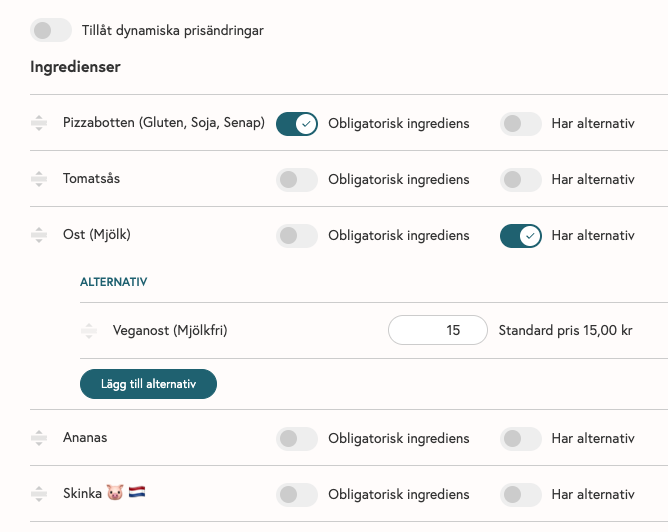
Below is an example from a Hawaiian pizza where ingredients are listed to give the customer the ability to edit based on needs and allergies:
Create an ingredient
Ingredients are created in the back office under Products > Ingredients.

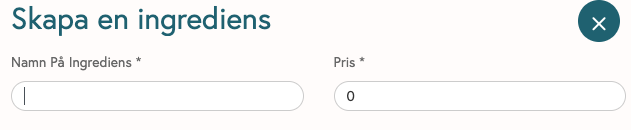
To create an ingredient, a name is required.
You can also set a price for the ingredient.
Priced ingredients can be linked to an add-on group, which allows you to offer guests extra options for an additional cost, for example:
extra protein
extra sauce
This way, add-ons can be managed in a structured manner and used both at the register and online.
Once your ingredients are created, the next step is to add them to your product and set up a workflow where you offer guests the option to remove or add extras as needed.
To add ingredients to your product, navigate to the product > Advanced Settings > Ingredients & Add-ons > click Add Ingredient and select what the product should contain.
If you want to give guests different options (e.g., different proteins or toppings), enable “Has options” and select the options you want to offer.
If the ingredient should not be removable from your product, enable “Required ingredient.” This locks the ingredient to the product and therefore cannot be removed or edited.
Was this helpful?
Still need help? Share an idea